The Forge
The built-in catalogue is big, but your life is specific. The Forge is where community-built custom AI skills live: abilities created by other Carae users, reviewed for safety, free to install.
Browsing community skills
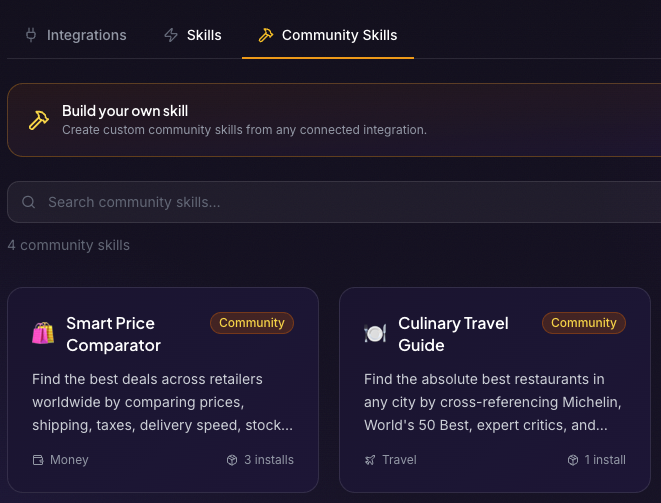
Community skills live in the Community Skills tab of the Skills page. Each one has its own detail page showing exactly what it does and how it works, and that page is where you install it, so you can always read before you run. In chat, Carae will point you to the detail page rather than installing a community skill blind. That is deliberate.
Safety first
Every submitted skill is reviewed before anyone can install it. An automatic filter goes first, then two independent AI reviews: if both pass, the skill is published; if either fails, it is not; if they disagree, a person decides. A skill that runs on a schedule always waits for a person's approval. After publication every skill has a report button, and enough reports switch a skill off for everyone until it has been checked again.
Building your own (Pro)
On the Pro plan you can build skills yourself, no coding required, in a three step wizard:
- Describe it: tell the Forge what the skill should do and AI drafts the whole thing.
- Review & Edit: refine the wording and behaviour until it feels right.
- Submit: it goes through the same safety review as everything else, and My Skills shows where it stands.
A skill starts when you want it to: a command like /sourdough, a phrase you say, or once a day on a schedule in your own time zone. It can use web search, read pages and do deep research, and work with up to three of your integrations, never Gmail, Google Calendar, Microsoft 365, Link Wallet or a social media account. Once published, it has its own page on carae.ai to share, and your display name appears on it. Build the niche thing you always wanted: a skill that tracks your book club, formats your D&D session notes, or nags you about your sourdough starter.
Why bother
Because the best assistant features are the ones nobody else needed. One user's oddly specific skill is another user's "finally, exactly this."